

Hey all; I have a potential job flying my Mavic 2 Pro for the contractor that gets the bid for this job:
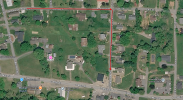
This is in a residential section of town. Half of the linear feet are on a street headed East/West; the other half are on a street headed North/South. (They are connected, so the full path is a big "L" shape.) Lots of trees lining both sides of both streets, some light poles, etc.
(Here's what it looks like, but this is not the actual streets (or even the same state!) for security.)
The path itself is easy enough to setup in DD; but when I do the simulation (within DD) the sim drone flies to the 1st waypoint, points North, flies sideways (to the right) on the East/West street, then backwards on the North/South street.
My question is:
Is that what the drone will do in a real flight? Fly sideways?
Since side obstical avoidance is only available in active track or tripod mode on the Mavic 2 Pro, that would cause the flight to last like, I dunno...17 years?
Thoughts?
The project includes replacement of over 4,300 linear feet of water mains with new 8-inch diameter mains, as well as replacement of associated water services and fire hydrants.
This is in a residential section of town. Half of the linear feet are on a street headed East/West; the other half are on a street headed North/South. (They are connected, so the full path is a big "L" shape.) Lots of trees lining both sides of both streets, some light poles, etc.
(Here's what it looks like, but this is not the actual streets (or even the same state!) for security.)
The path itself is easy enough to setup in DD; but when I do the simulation (within DD) the sim drone flies to the 1st waypoint, points North, flies sideways (to the right) on the East/West street, then backwards on the North/South street.
My question is:
Is that what the drone will do in a real flight? Fly sideways?
Since side obstical avoidance is only available in active track or tripod mode on the Mavic 2 Pro, that would cause the flight to last like, I dunno...17 years?
Thoughts?